Shopping cart optimization for Shopify stores
How to find where your Shopify cart loses buyers, fix the drawer or cart page settings that cause it, and A/B test cart changes on revenue per visitor.

Rishi Babu
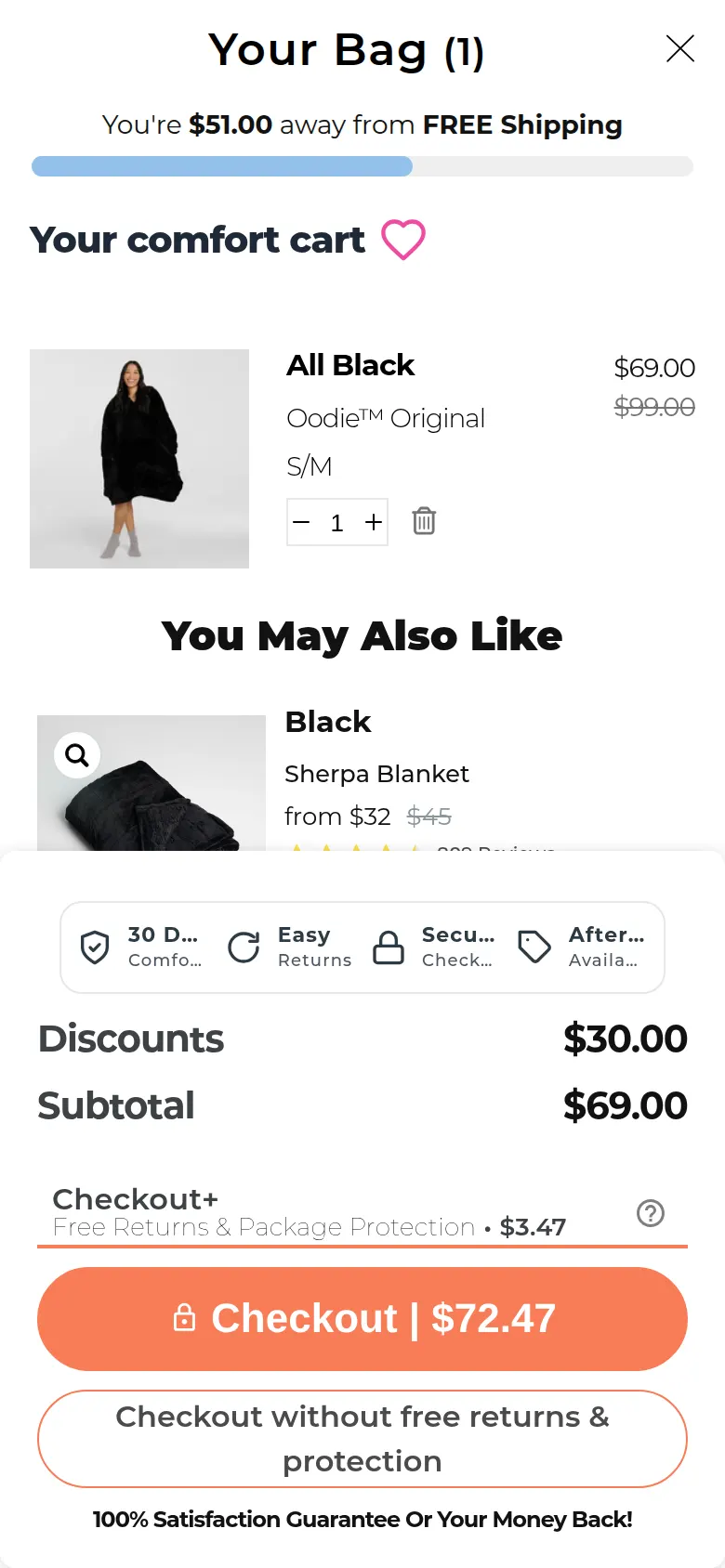
What your Shopify cart is doing between add to cart and checkout
On Shopify, "the cart" is one of three things, and you pick which in the theme editor. In Online Store > Themes > Edit theme > Theme settings > Cart, the Cart type setting in Shopify's free themes offers Drawer, Page or Popup notification (Shopify's theme settings help). Paid themes name the options differently, but nearly all have the same choice.
| Cart type | What the shopper sees after adding | Where it tends to go wrong |
|---|---|---|
| Drawer | A panel slides in over the product page with the cart and a checkout button | Upsell apps, banners and a note field stack up until the checkout button sits below the fold on mobile |
| Page | The shopper is sent to /cart | An extra page load, and a "continue shopping" button that competes with checkout |
| Popup notification | A small confirmation under the cart icon with "View cart" and "Check out" | Easy to miss on mobile, so shoppers tap add to cart twice or never see the total |
The cart is also the last place your theme and apps fully control. Shopify switched off checkout.liquid for the information, shipping and payment steps on 13 August 2024 (Shopify's checkout.liquid docs), so on most plans the checkout itself is close to fixed. Whatever you want to say about delivery dates, returns or the free shipping threshold, the cart is your last chance to say it in your own words, and the last page where a testing script can run.
Find out whether the cart is your leak
Pull the numbers before you touch the drawer:
- In your Shopify admin, go to Analytics > Reports, filter the category to Behavior and open Conversion rate breakdown.
- Pick at least four full weeks after 23 September 2026. Shopify changed how it counts sessions between 21 and 23 September 2026 (Shopify's behaviour reports help), so don't compare across that week.
- Note the session counts, not the percentages. Shopify divides every step by total sessions, which makes the checkout step look worse than it is.
- Divide Sessions that reached checkout by Sessions with cart additions. That's your cart-to-checkout rate.
- Split it by device, then by traffic source.
Shopify only counts a session as reaching checkout when the shopper types or clicks something in checkout, so someone who opens checkout and bails straight away is still a cart loss in this report.
Here is an example of how that plays out. Picture a Melbourne activewear brand doing about 38,000 product page visits a month. Last month it had 3,100 sessions with cart additions and 1,350 that reached checkout. That's 43.5% overall, but 51% on desktop and 39% on mobile. The founder had been blaming Meta CPMs. The mobile cart was the bigger problem: after raising the free shipping threshold from $80 to $100 when the 3PL put prices up, the drawer now opened with "You're $41 away from free shipping" above a four-product upsell carousel, and the checkout button sat under all of it.
If cart-to-checkout looks fine and the drop is before add to cart, start with the add to cart rate guide instead. If buyers reach checkout and then stall, the Shopify checkout optimization guide covers that step, and cart abandonment rate formula explains the different ways that number gets calculated.
Run the cart check on your own phone
Add your best-selling product to the cart on a mid-size phone, on mobile data, and go through this list. Then do it again with three items and a discount code.
Anything that fails here is a fix, not a test. A free shipping bar promising $100 when your Australian shipping profile says $120 is a bug. So is a checkout button hidden behind a chat widget on iPhones.
Cart fixes that are usually safe to ship
Some cart problems have one right answer, and testing them wastes traffic:
- Wrong or missing costs. If shipping turns up for the first time at checkout, show it, or the progress toward free shipping, in the cart.
- A broken or doubled confirmation. If shoppers can't tell the add worked, they add twice or leave. Fix the drawer or notification so it always opens or updates.
- Wallet buttons switched off. If Shop Pay or Apple Pay is active in your payment settings and your theme can show it in the cart, turn it on. Shopify's accelerated checkout help explains which buttons appear and why they vary by device and browser.
- App clutter. Three apps each adding a banner, a timer and a carousel to the same drawer is a cleanup job. Remove what you can't explain the purpose of.
- A cart note nobody uses. Shopify's Enable cart note setting adds a text box. If you aren't a gift or custom-order business, it's another field between the shopper and the button.
Fix these first, give the change a week, and check the cart-to-checkout rate again before you start testing.
Cart A/B tests worth running
Once the cart is working, the open questions are about what earns its space. Pick the test that matches where your funnel leaks, and test one change at a time. Shoppers who arrive from a TikTok ad behave differently from repeat email buyers, and bundling three cart changes into one variant tells you nothing about which one moved them.
| What you'd change | Hypothesis | Judge it on | Guardrail |
|---|---|---|---|
| Cart type | Opening a drawer on add to cart gets more mobile shoppers to checkout than sending them to /cart | Revenue per visitor | Items per order |
| Upsell block | Showing one related add-on instead of a four-product carousel gets more buyers to checkout without lowering order value | Revenue per visitor | Average order value |
| Free shipping message | "Add $41 for free delivery" with a suggested item lifts order value more than it costs in abandoned carts | Revenue per visitor | Cart-to-checkout rate |
| Delivery line | "Order by 2pm for dispatch today" near the button beats a generic "Fast shipping" line | Revenue per visitor | Checkout completion rate |
| Wallet buttons | Showing Shop Pay and Apple Pay above the main checkout button moves more mobile buyers to payment | Revenue per visitor | Orders per cart session |
| Sticky checkout bar | A fixed subtotal and checkout bar on long mobile carts gets more three-plus item carts to checkout | Revenue per visitor | Cart-to-checkout rate |
Judge every one on revenue per visitor. A cart with no upsell will almost always send more people to checkout, and it can still make less money if the add-on was carrying your margin. The free shipping threshold guide and how to increase AOV go deeper on the order value side.
Traffic decides how small a change you can measure. Take the Melbourne store with 3,100 cart sessions a month and a 43.5% cart-to-checkout rate. Detecting a lift to 48% needs roughly 1,900 cart sessions per variant at 95% significance and 80% power, so a two-variant test takes five to six weeks. A change in button colour won't show up at that traffic. Moving the checkout button above the carousel might. Run your own numbers in the sample size calculator before you launch.
Set the rules before the test starts:
A big backlog of cart ideas is a fair way to work. It keeps the next test ready and makes testing faster. Its one weakness is that it doesn't build on what you learn: if the delivery cut-off line wins on mobile and does nothing on desktop, that tells you mobile buyers are worried about timing, and the next test should probably chase that before the next idea on the list.
Who should run your cart tests
DIY apps such as Intelligems, Shoplift and Visually have got a lot more Shopify stores testing, and that's good for everyone. The hours around them are still yours: pulling the funnel, writing hypotheses, designing the drawer variants, building them and reading the results. Retainer agencies take that work on and bill the same each month whether the cart converts better or not.
Cascayd is outcome-based and hands-off. Our team does the research, strategy and creative design, and AI speeds up the build and the grunt work. Each test arrives in Slack with the reasoning, you approve it or ask for changes, and Cascayd is paid only from a share of the measured uplift. See how the Shopify CRO service works.
Your next step
Open Conversion rate breakdown today, filter to the four weeks after 23 September 2026, and work out your mobile cart-to-checkout rate from the session counts. Then add your best seller to the cart on your own phone and run the checklist above. If you'd rather have the cart researched, tested and judged on revenue for you, book a call and tell us about your store.